 Support Hub
My Employees Accrued Time
Report that retrieves the total accrued Compensatory Time Off (CTO) hours for active employees within a specified date range, filtered for employees that the current user has access to
Parameters
{mindate}- Starting date for the accrual activity period (example: '2023-01-01'){maxdate}- Ending date for the accrual activity period (example: '2023-12-31'){userid}- The user ID of the person running the report to filter for their accessible employees
Data Components
The report consists of one main query that joins employee data with accrual activity records and filters based on user access.
Example Output
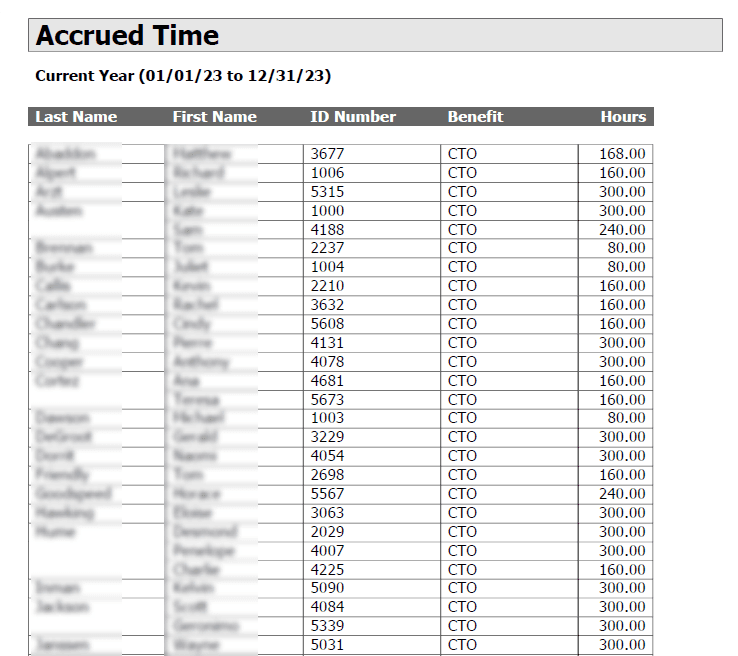
💡 Click the image above to zoom in and see the details more clearly!
The report displays a list of employees with their total CTO (Compensatory Time Off) hours accrued during the specified period.
Technical Implementation
The script uses:
- Aggregation with
SUMto calculate total accrued hours ISNULLfunction to handle null values- Subquery to filter employees based on the current user's workgroup access permissions
- Filtering for active employees only (
activestatus=0) - Filtering for specific benefit types (BENEFIT in (1)) and rule IDs (RULEID in (2,4))
T-SQL
Select E.Lastname, e.firstname, e.idnum, 'CTO', ISNULL(Sum(a.HOURS ),0)
from Employees e, ACCRUALACTIVITY a
where e.filekey=a.filekey and a.EVENTDATE between {mindate} and {maxdate}
    and a.BENEFIT in (1)
    and a.RULEID in (2,4)
    and e.activestatus=0
    --MY EMPLOYEES
    AND
    (((SELECT COUNT(*)
    FROM USERACCESS U
    WHERE (U.USERID={userid}) AND (((U.WG1=E.WG1) OR (U.WG1=0)) AND ((U.WG2=E.WG2) OR (U.WG2=0)) AND ((U.WG3=E.WG3) OR (U.WG3=0)) AND ((U.WG4=E.WG4) OR (U.WG4=0))))>0))

Group by e.lastname, e.firstname, e.idnum
order by 1
Content Inventory
- Doc File:
content/docs/reports/employee_information/my_emps_accrued_time.mdx - SQL Script:
SQL/reports/employee_information/my_emps_accrued_time.sql - Screenshot:
public/img/screenshots/reports/employee_information/AccruedTime.png