 Support Hub
Active Employees at Time of Search
Overview
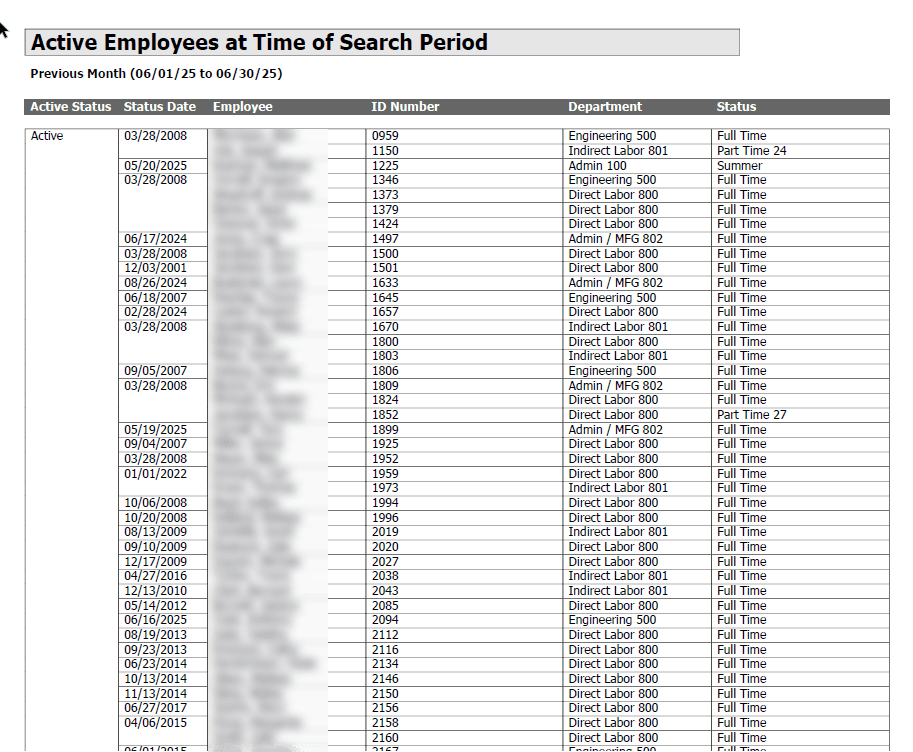
The "Active Employees at Time of Search" report generates a list of all employees who were considered active within a specified date range. This report is crucial for historical analysis, allowing you to determine the workforce composition at a specific point in the past, regardless of their current employment status. It considers both current status and historical status change records to provide an accurate snapshot.
Key Features
- Point-in-Time Analysis: Identifies employees active on any given date or within a date range.
- Historical Accuracy: Uses employee status history (
empactstatushist) to correctly identify active employees, even if they have since been terminated. - Detailed Information: Provides key employee details including their name, ID number, workgroup, and employment status.
- Flexible Date Range: Allows users to specify a start and end date for the analysis period.
How It Works
The report queries the EMPLOYEES table and cross-references it with empactstatushist and EMPSTATUSHIST to build a complete picture of an employee's status over time. It uses a temporary table to handle workgroup history (EMPHOMEWGHIST) ensuring the correct workgroup at the time is reported. The logic specifically checks for active status (ACTIVESTATUS = 0) effective before the end date of the search, and also includes employees who were terminated within the search period.
Download Alternative Formats
📥 AOD Browser Report Format:
- Download AOD Import File - Import this report directly into AOD Service Module.
SQL Code
SET NOCOUNT ON;
SET ANSI_WARNINGS OFF;

DECLARE @MIN DATE = {mindate};
DECLARE @MAX DATE = {maxdate};
/*
-- For testing:
-- SET @MIN = '2020-06-18';
-- SET @MAX = '2018-11-01';
*/

-- Workgroup lookup table
DECLARE @WG TABLE (
    FILEKEY INT,
    EFFDATE DATETIME,
    WG1 VARCHAR(30),
    WG2 VARCHAR(30)
);

-- Current workgroups
INSERT INTO @WG
    (FILEKEY, EFFDATE, WG1, WG2)
SELECT
    e.FILEKEY,
    e.WGEFFDATE,
    w1.name,
    w2.name
FROM
    EMPLOYEES e
    INNER JOIN WORKGROUP1 w1 ON e.wg1 = w1.wgnum
    INNER JOIN WORKGROUP2 w2 ON e.wg2 = w2.WGNUM;

-- Workgroup history
INSERT INTO @WG
    (FILEKEY, EFFDATE, WG1, WG2)
SELECT
    wgh.filekey,
    wgh.EFFDATE,
    w1.name,
    w2.name
FROM
    EMPHOMEWGHIST wgh
    INNER JOIN WORKGROUP1 w1 ON wgh.wg1 = w1.wgnum
    INNER JOIN WORKGROUP2 w2 ON wgh.wg2 = w2.WGNUM;

-- Main query with status history and hourly status history
SELECT
    e.FILEKEY,
    CASE
        WHEN e.ACTIVESTATUS = 0 THEN 'Active'
        ELSE 'Terminated'
    END AS Status,
    e.ACTIVESTATUSEFFDATE,
    e.LASTNAME + ', ' + e.FIRSTNAME AS Name,
    e.IDNUM,
    wg.WG2,
    -- Hourly status as of the search period (name from STATUSTYPES)
    st.NAME AS HourlyStatusInPeriod
FROM
    EMPLOYEES e
    CROSS APPLY (
        SELECT TOP 1
        WG1, WG2
    FROM @WG
    WHERE FILEKEY = e.FILEKEY AND EFFDATE <= @MAX
    ORDER BY EFFDATE DESC
    ) wg
    OUTER APPLY (
        SELECT TOP 1
        effdate, status
    FROM empactstatushist h
    WHERE h.filekey = e.filekey
    ORDER BY effdate DESC
    ) hist
    OUTER APPLY (
        SELECT TOP 1
        STATUS
    FROM EMPSTATUSHIST sh
    WHERE sh.FILEKEY = e.FILEKEY AND sh.EFFDATE <= @MAX
    ORDER BY sh.EFFDATE DESC
    ) hs
    LEFT JOIN STATUSTYPES st
    ON st.NUM = COALESCE(hs.STATUS, e.STATUS)
WHERE
    (
        (e.ACTIVESTATUS = 0 AND e.ACTIVESTATUSEFFDATE <= @MAX)
    OR
    (
            e.ACTIVESTATUSEFFDATE > @MAX
    AND hist.effdate <= @MAX
    AND hist.status = 0
        )
    OR
    (
            hist.effdate BETWEEN @MIN AND @MAX
    AND hist.status = 1
        )
    )
ORDER BY
    Status,
    e.IDNUM,
    Name;
Content Inventory
- Doc File:
content/docs/docs/reports/employee_information/active_emp_at_time_of_search.mdx - SQL Script:
SQL/reports/employee_information/active_emp_at_time_of_search.sql