 Support Hub
Calendar Report Card - Combined
Comprehensive calendar-style view combining both pay designation hours and incident data for an employee, displaying pay designation abbreviations with hours and incident abbreviations in a unified monthly calendar format
Parameters
The script is currently configured with hardcoded values:
- Employee:
filekey = 1- Specific employee to analyze - Year:
2022- Year for analysis
Note: These values should be modified in the script before execution.
Data Components
The report consists of 4 main sections:
- Employee and Month Information - Employee identifier and month name
- Query and Pay Order - Sorting and grouping identifiers
- Pay Designation Calendar - Daily pay designation hours in calendar format
- Incidents Calendar - Daily incident abbreviations in calendar format
Example Output
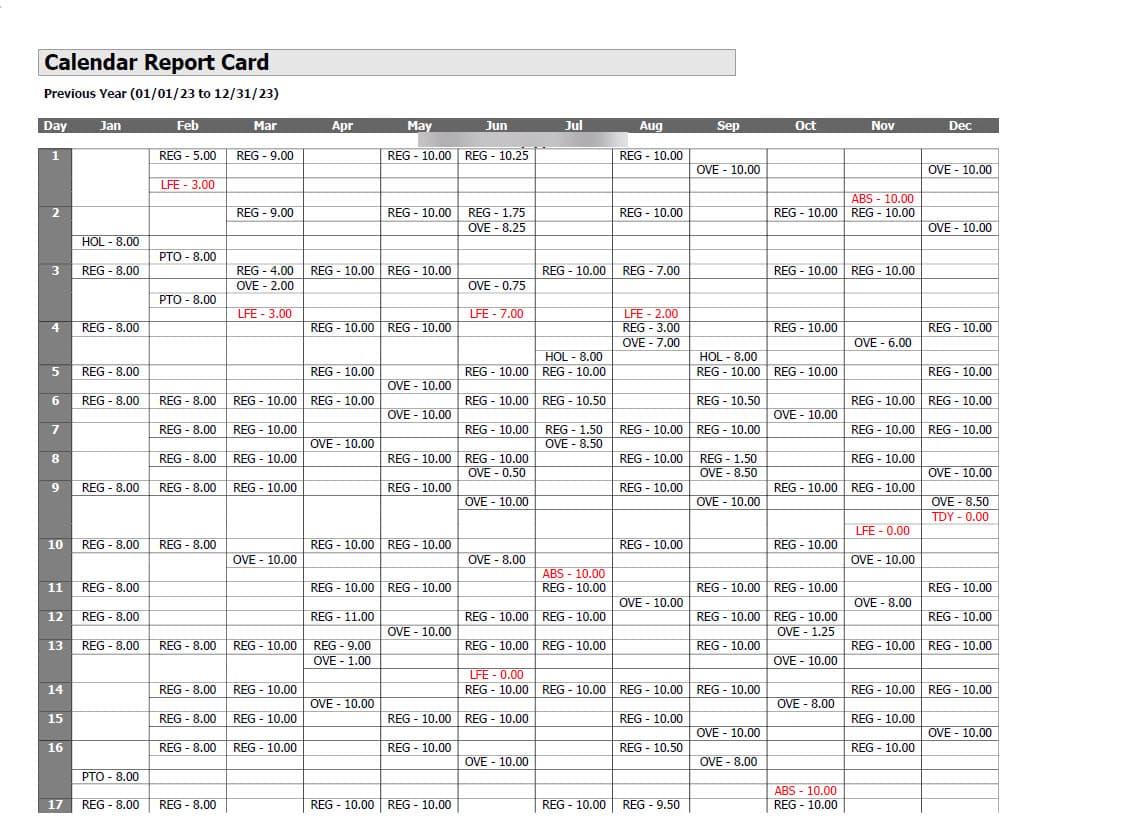
💡 Click the image above to zoom in and see the calendar details more clearly!
The report displays a calendar-style view combining both pay designation hours and incident data for an employee in a unified monthly format.
Technical Implementation
The script uses:
- UNION operation - Combines pay designation and incident data
- PIVOT operations - Transforms daily data into calendar columns for both datasets
- QueryOrder field - Distinguishes between pay designations (1) and incidents (2)
- PayOrder field - Orders pay designations by number, incidents use 100
- String concatenation - Combines pay designation abbreviations with hours
- CAST operations - Formats decimal hours for display
- Complex ORDER BY - Sorts by employee, month, query type, and pay order
- Date conversion - Handles month name to date conversion for proper sorting
T-SQL
SELECT
    filekey,
	QueryOrder,
	PayOrder,
    MonthName,
    Day1, Day2, Day3, Day4, Day5,
    Day6, Day7, Day8, Day9, Day10,
    Day11, Day12, Day13, Day14, Day15,
    Day16, Day17, Day18, Day19, Day20,
    Day21, Day22, Day23, Day24, Day25,
    Day26, Day27, Day28, Day29, Day30, Day31
FROM (
    -- Your existing query for the first table goes here
	SELECT
    filekey,
	1 as QueryOrder,
	PAYDESNUM as PayOrder,
    MonthName,
    [1] AS Day1, [2] AS Day2, [3] AS Day3, [4] AS Day4, [5] AS Day5,
    [6] AS Day6, [7] AS Day7, [8] AS Day8, [9] AS Day9, [10] AS Day10,
    [11] AS Day11, [12] AS Day12, [13] AS Day13, [14] AS Day14, [15] AS Day15,
    [16] AS Day16, [17] AS Day17, [18] AS Day18, [19] AS Day19, [20] AS Day20,
    [21] AS Day21, [22] AS Day22, [23] AS Day23, [24] AS Day24, [25] AS Day25,
    [26] AS Day26, [27] AS Day27, [28] AS Day28, [29] AS Day29, [30] AS Day30, [31] AS Day31
FROM (
    SELECT
        pd.filekey,
        DAY(pd.eventdate) AS DayOfMonth,
        pds.abb + ' - ' + CAST(CAST(pd.Hours AS DECIMAL(10, 2)) AS VARCHAR) AS Hours,
        MONTH(pd.eventdate) AS MonthNumber,
        DATENAME(MONTH, pd.eventdate) AS MonthName,
        pd.PAYDESNUM
    FROM paydeshist pd
    INNER JOIN PAYDESIGNATIONS pds ON pd.PAYDESNUM = pds.PAYDESNUM
    WHERE pd.filekey IN (1) -- Change the filekey value to 1
    AND YEAR(pd.eventdate) = 2022 -- Replace with the desired year
) AS SourceData
PIVOT (
    MAX(Hours) -- Use MAX to handle string concatenation
    FOR DayOfMonth IN ([1], [2], [3], [4], [5], [6], [7], [8], [9], [10],
                     [11], [12], [13], [14], [15], [16], [17], [18], [19], [20],
                     [21], [22], [23], [24], [25], [26], [27], [28], [29], [30], [31])
) AS PivotTable

    UNION

    -- Your existing query for the second table goes here
	SELECT
    filekey,
	QueryOrder,
	PayOrder,
    MonthName,
    [1] AS Day1, [2] AS Day2, [3] AS Day3, [4] AS Day4, [5] AS Day5,
    [6] AS Day6, [7] AS Day7, [8] AS Day8, [9] AS Day9, [10] AS Day10,
    [11] AS Day11, [12] AS Day12, [13] AS Day13, [14] AS Day14, [15] AS Day15,
    [16] AS Day16, [17] AS Day17, [18] AS Day18, [19] AS Day19, [20] AS Day20,
    [21] AS Day21, [22] AS Day22, [23] AS Day23, [24] AS Day24, [25] AS Day25,
    [26] AS Day26, [27] AS Day27, [28] AS Day28, [29] AS Day29, [30] AS Day30, [31] AS Day31
FROM (
    SELECT
        filekey,
		2 as QueryOrder,
		100 as PayOrder,
		MONTH(eventdate) AS MonthNumber,
        DATENAME(MONTH, eventdate) AS MonthName,
        DAY(eventdate) AS DayOfMonth,
        INCIDENTABB
    FROM INCIDENTS
    WHERE rulesource NOT IN (1)
        AND filekey = 1
        AND YEAR(eventdate) = 2022
) AS SourceData
PIVOT (
    MAX(INCIDENTABB) -- Use MAX to handle string concatenation
    FOR DayOfMonth IN ([1], [2], [3], [4], [5], [6], [7], [8], [9], [10],
                     [11], [12], [13], [14], [15], [16], [17], [18], [19], [20],
                     [21], [22], [23], [24], [25], [26], [27], [28], [29], [30], [31])
) AS PivotTable

) AS CombinedData

ORDER BY filekey,
         CASE WHEN ISDATE(MonthName + ' 1, 2000') = 1
              THEN CONVERT(DATE, '1 ' + MonthName + ' 2000', 106)
              ELSE NULL
         END,
         QueryOrder, PayOrder;
Content Inventory
- Doc File:
content/docs/reports/employee_information/calendar_report_card_combined.mdx - SQL Script:
SQL/reports/employee_information/calendar_report_card_combined.sql - Screenshot:
public/img/screenshots/reports/employee_information/CalendarReportCard.jpg