 Support Hub
Calendar Report Card (Month as Columns)
Calendar-style view of an employee's pay designation hours throughout the year, with months displayed as columns and days as rows, showing pay designation abbreviation and hours worked
Parameters
The script has two embedded parameters that need to be modified for specific use:
- Employee FILEKEY (hardcoded to 2485 in the example)
- Year (hardcoded to 2022 in the example)
Data Components
The report consists of two main parts:
- NumberedData CTE - Retrieves the employee's pay designation history with formatting
- Main Query - Pivots the data to display months as columns and days as rows
Example Output
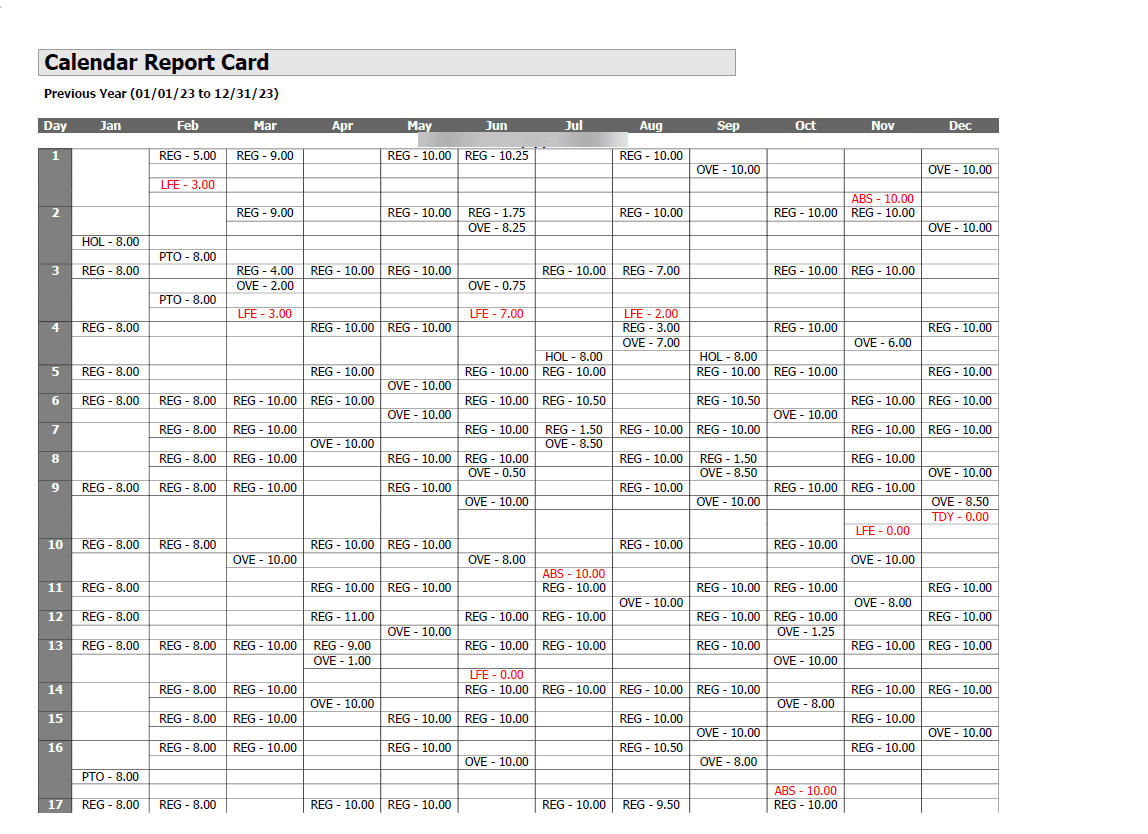
💡 Click the image above to zoom in and see the calendar details more clearly!
The report outputs a calendar-style table with days of the month as rows and months as columns. Each cell contains the pay designation abbreviation and hours worked in the format: "PAY - HH.HH" (where PAY is the pay designation abbreviation and HH.HH is the hours worked).
Technical Implementation
The script uses:
- Common Table Expression (CTE) to prepare and format the data
DAY(),MONTH(), andDATENAME()functions to extract date components- Conditional aggregation with
CASEstatements to pivot months into columns - String concatenation to combine pay designation abbreviation with formatted hours
DECIMAL(10,2)casting to ensure consistent hour formatting- Grouping by filekey, day of month, and pay designation number
- Multiple ordering criteria for proper display order
T-SQL
WITH NumberedData AS (
    SELECT
        pd.filekey,
        DAY(pd.eventdate) AS DayOfMonth,
        pds.abb + ' - ' + CAST(CAST(pd.Hours AS DECIMAL(10, 2)) AS VARCHAR) AS Hours,
        MONTH(pd.eventdate) AS MonthNumber,
        DATENAME(MONTH, pd.eventdate) AS MonthName,
        pd.PAYDESNUM
    FROM paydeshist pd
    INNER JOIN PAYDESIGNATIONS pds ON pd.PAYDESNUM = pds.PAYDESNUM
    WHERE pd.filekey IN (2485) -- Change the filekey value to 1
    AND YEAR(pd.eventdate) = 2022 -- Replace with the desired year
)

SELECT
    filekey,
    DayOfMonth,
    MAX(CASE WHEN MonthNumber = 1 THEN Hours END) AS January,
    MAX(CASE WHEN MonthNumber = 2 THEN Hours END) AS February,
    MAX(CASE WHEN MonthNumber = 3 THEN Hours END) AS March,
    MAX(CASE WHEN MonthNumber = 4 THEN Hours END) AS April,
    MAX(CASE WHEN MonthNumber = 5 THEN Hours END) AS May,
    MAX(CASE WHEN MonthNumber = 6 THEN Hours END) AS June,
    MAX(CASE WHEN MonthNumber = 7 THEN Hours END) AS July,
    MAX(CASE WHEN MonthNumber = 8 THEN Hours END) AS August,
    MAX(CASE WHEN MonthNumber = 9 THEN Hours END) AS September,
    MAX(CASE WHEN MonthNumber = 10 THEN Hours END) AS October,
    MAX(CASE WHEN MonthNumber = 11 THEN Hours END) AS November,
    MAX(CASE WHEN MonthNumber = 12 THEN Hours END) AS December
FROM NumberedData
GROUP BY filekey, DayOfMonth, PAYDESNUM
ORDER BY filekey, DayOfMonth, PAYDESNUM;
Content Inventory
- Doc File:
content/docs/reports/employee_information/calendar_report_card_month_as_columns.mdx - SQL Script:
SQL/reports/employee_information/calendar_report_card_month_as_columns.sql - Screenshot:
public/img/screenshots/reports/employee_information/calendar_report_card_month_as_columns.png
Calendar Report Card - Incidents
Calendar-style view of employee incidents, displaying incident abbreviations for each day of the month in a pivot table format, providing a visual monthly overview of attendance incidents
Calendar Report Card (Month as Columns - Combined)
Comprehensive calendar-style view that combines both pay designation hours and exceptions for active employees within a specified date range, displaying months as columns and days as rows