 Support Hub
Sum Hours by Period Report
This report calculates compensatory time earned by employees across multiple pay periods within a specified date range. The script processes pay period data and aggregates compensatory hours (paydesnum 21) for each employee, applying a 1.5x multiplier to calculate the compensatory time value.
Parameters
@MIN- Start date for the report period (example: '6/30/2019')@MAX- End date for the report period (example: '7/1/2020')
Data Components
The report consists of 3 main processing sections:
- Pay Period Selection - Identifies all pay periods that overlap with the specified date range
- Employee Hours Aggregation - Sums compensatory hours for each employee within each pay period
- Results Calculation - Applies 1.5x multiplier and formats output
Example Output
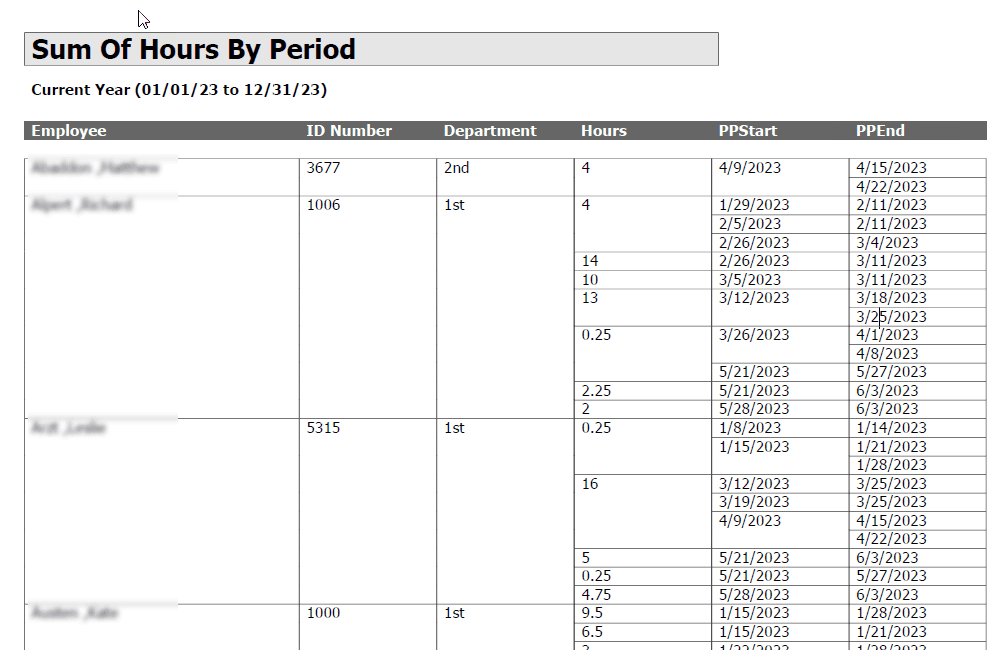
💡 Click the image above to zoom in and see the details more clearly!
Technical Implementation
The script uses:
- Table variables for temporary data storage (@PP, @COMP)
- Cursor-like processing with WHILE loop for pay period iteration
- ROW_NUMBER() window function for ordered processing
- Pay designation 21 specifically for compensatory time tracking
- Date range filtering with BETWEEN operations
Notes
- Only processes pay class 1 pay periods
- Compensatory time is identified by paydesnum = 21
- Results are multiplied by 1.5 to reflect time-and-a-half compensation
- Output is sorted by employee name and pay period start date
T-SQL
SET NOCOUNT ON
SET ANSI_WARNINGS OFF

Declare @MIN DATE, @MAX DATE ,@PPSTART Date, @PPEND Date, @RowCount Int, @CurrentRow int

SET @MIN={mindate}
SET @MAX={maxdate}
/*
SET @MIN='6/30/2019'
SET @MAX='7/1/2020'
*/

DECLARE @PP Table (UNIQUEID int,
    PPClass int,
    Begindate date,
    EndDate date)
DECLARE @COMP Table (Filekey int,
    Lastname varchar(50),
    Firstname varchar(50),
    Idnum varchar(50),
    TimeLoc varchar(50),
    CompEarned Decimal(38,2),
    PPStart datetime,
    PPEnd Datetime)

Insert into @PP
Select UNIQUEID, ppclass, Begindate, EndDate
from PAYPERIODINFO
where PPCLASS=1 and ((BEGINDATE<@MIN and ENDDATE>@MIN) or (BEGINDATE>@MIN and ENDDATE<@MAX) or (BEGINDATE<@MAX and ENDDATE>@MAX) or (BEGINDATE=@MIN and ENDDATE=@MAX))

Set @RowCount = (Select Count(*)
from @PP)
Set @CurrentRow = 1

While @CurrentRow<=@RowCount
	Begin
    Set @PPSTART = (Select Begindate
    from (Select row_number() Over (order by begindate) as RowNum, *
        from @PP) t2
    where RowNum = @CurrentRow)
    Set @PPEND = (Select EndDate
    from (Select row_number() Over (order by begindate) as RowNum, *
        from @PP) t2
    where RowNum = @CurrentRow)

    Insert INTO @COMP
    Select e.filekey, e.lastname, e.firstname, e.idnum, w5.name, isnull(sum(pd.hours),0), @PPStart, @PPEND
    from EMPLOYEES e, WORKGROUP5 w5, PAYDESHIST pd
    Where e.filekey = pd.filekey
        and w5.wgnum = pd.wg5
        and pd.paydesnum = 21
        and pd.EVENTDATE between @PPSTART and @PPEND
    Group by e.FILEKEY, e.LASTNAME, e.FIRSTNAME, e.IDNUM, w5.NAME

    Set @CurrentRow = @CurrentRow+1
End

Select Lastname+' ,'+Firstname, Idnum, TimeLoc, CompEarned*1.5, PPStart, PPEnd
from @COMP
order by 1,5
Content Inventory
- Doc File:
content/docs/reports/pay_information/sum_hours_by_period.mdx - SQL Script:
SQL/reports/pay_information/sum_hours_by_period.sql - Image:
public/img/screenshots/reports/pay_information/SumOfHrByPeriod.png